
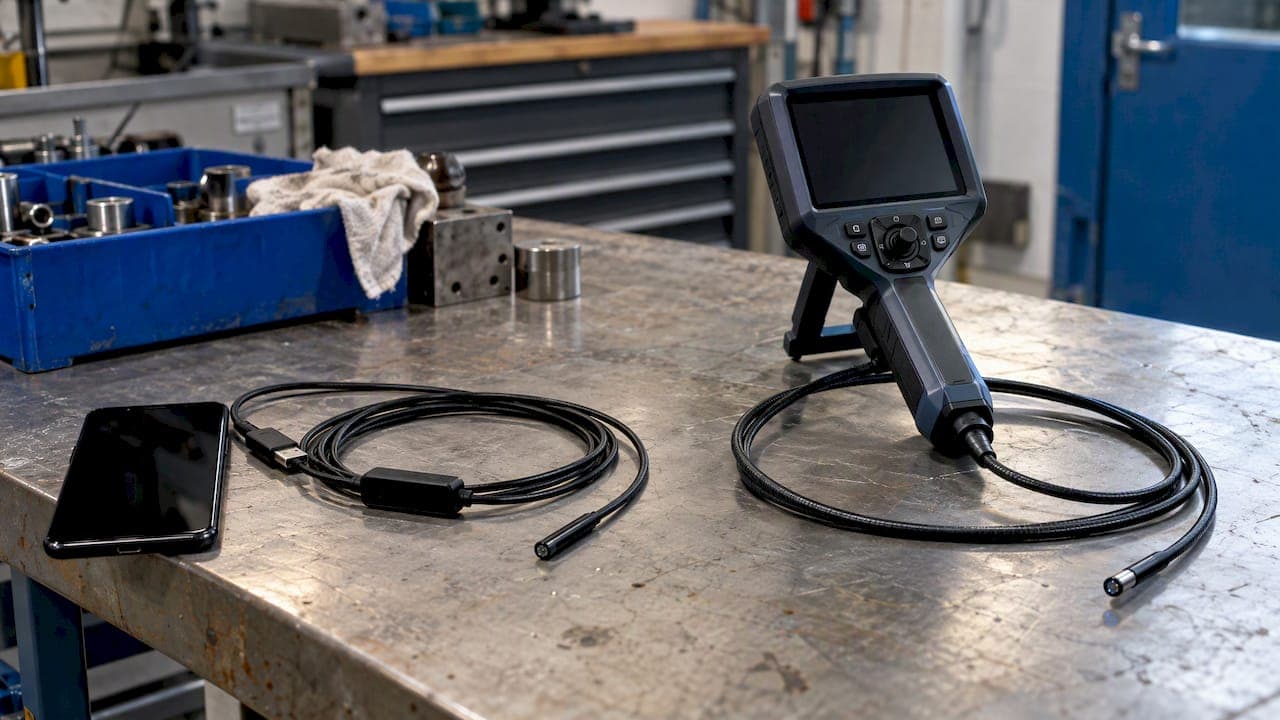
A USB borescope is a small camera on a cable that plugs into a phone, tablet or PC and uses that device as the screen. A videoscope is a self-contained inspection system: a camera tip, usually with controlled articulation, a built-in or dedicated monitor, its own light source and onboard recording. Choose a USB borescope for quick, occasional looks in easy spaces. Choose a videoscope when the findings must be accurate, documented and repeatable, or when the probe has to be steered.
The terms get blurred. People call almost anything with a camera on a cable a "borescope," and many videoscopes are sold as video borescopes. This guide separates them by what matters at the bench or in the barn: optics, interface, control, recording, durability and cost of ownership.
TL;DR
- A USB borescope depends on a host device for display and software. A videoscope is a complete system with its own monitor, light and storage.
- USB suits documentation and PC-based reporting. A direct monitor or HDMI path suits live, real-time work where lag is a nuisance.
- Articulation, probe durability and image consistency are where videoscopes pull ahead of budget USB units.
- A true rigid borescope is a different tool again: optical, straight and very sharp, but it cannot turn corners.
- For veterinary and industrial professionals, a dedicated, cleanable, repairable system usually costs less over time than replacing consumer gear.
Table of Contents
- What each tool actually is
- Side by side
- USB or HDMI: the interface question
- Image quality: resolution is not the whole story
- Control and articulation
- Recording and workflow
- The hidden cost of tying a scope to a phone
- Veterinary use: cleaning and reprocessing
- Perspective: what we see from the counter
- How to choose: five questions
- Where our products fit
- When a USB borescope is the right call
- FAQ
- Sources
What each tool actually is
The USB borescope
A USB borescope is an inspection camera with a semi-rigid or flexible cable, an LED ring around a small lens, and a USB plug. Many are built for Android phones, and some are Wi-Fi models. One example described in an electricians' forum thread is a 9 mm camera with six LEDs on a 10-foot armored gooseneck cable, connecting by USB Type-C or micro-USB. That is typical: a lens, some light and a cable that you bend by hand.
Everything else comes from the host device. The screen, the processor, the storage and the app all belong to your phone or laptop.
The videoscope
A videoscope puts a CMOS or CCD sensor at the distal tip and sends a digital signal along the insertion tube to a monitor. Industrial models often add four-way articulation, a joystick or dial, adjustable brightness, and still and video capture to an SD card or similar media. Our guide to what a videoscope is walks through the main components and uses.
The key point is that the display and recording are part of the instrument. Nothing needs pairing, and no app has to survive the next operating system update.
Where the rigid borescope fits
A rigid borescope is an optical tube. Light and image travel through lenses, so it gives a straight-line view with essentially no electronic delay and very faithful color. It is excellent for short, straight bores, such as precision machined parts. It cannot bend. Many sources, including trade explanations of the videoscope and borescope split, treat the two as complementary: rigid for straight and short, videoscope for indirect and awkward paths. Visual testing standards bodies draw the same line between direct and remote visual inspection, as the American Society for Nondestructive Testing describes visual testing as a formal discipline that needs trained personnel and standardized equipment, not just a glance.
Side by side
| Criterion | USB borescope | Videoscope |
|---|---|---|
| Display | Phone, tablet or PC | Built-in or dedicated monitor |
| Light source | Small LEDs at the tip | Tip LEDs or external light source, adjustable |
| Articulation | Usually none, or a bendable gooseneck | Often controlled tip bending |
| Recording | Depends on the app and host | Onboard still and video, often SD card |
| Software dependency | High | Low |
| Probe build | Light duty | Reinforced, built for repeated use |
| Fits | Quick checks, hobby, light trade work | Professional inspection and documentation |
| Repairability | Usually replace | Service and repair is realistic |
None of this makes USB gear bad. It makes it a different class of tool.
USB or HDMI: the interface question
People also ask whether USB or HDMI is better for a videoscope. The answer depends on whether you are discovering or documenting.
USB connects the camera to a computer that handles image processing, display, measurement and storage. That makes it a good fit for lab work, defect analysis and reporting. HDMI feeds a monitor directly. One comparison of USB and HDMI imaging systems puts typical HDMI latency under 10 ms against roughly 100 to 300 ms for USB. Those figures come from microscope cameras, so treat them as a guide to how the two interfaces behave, not as a spec for any particular borescope.
Why does that matter? When you are steering a probe through a horse's airway or along a pipe, a lagging picture makes you overshoot. When you are sitting at a desk labeling a weld image, a few tenths of a second is irrelevant.
The practical rule:
- Live guidance (steering, biopsy, tight clearances): choose a direct monitor or HDMI path.
- Reports and measurement (archiving, annotations, client files): choose USB or a PC connection.
- Both: choose a system that offers both outputs, or one that records to SD card and also connects to a PC. The same source notes that buyers increasingly favor dual-interface equipment so they do not need separate setups.
Image quality: resolution is not the whole story
A "1080p" label on a USB borescope tells you about the output format, not the sensor, lens or lighting behind it. Small sensors in dim cavities produce noise, and cheap lenses distort edges. A professional videoscope with HD or Full HD output typically pairs the sensor with better optics and controlled light, so you see consistent detail from one inspection to the next.
Three things to check beyond the resolution number:
- Illumination. Tip LEDs are convenient but limited. An external light source gives you more output in long or dark cavities.
- Depth of field and focus. A fixed focus range that suits 2 to 6 inches may blur anything farther away.
- Probe diameter against image quality. The smaller the probe, the smaller the sensor. Very slim scopes trade detail for access, which is why we explain small diameter endoscopes by use case rather than by a single number.
Control and articulation
A gooseneck or pre-bent cable holds a shape, but it cannot be steered after insertion. If you push it into a cavity and the lens points at a wall, you pull it out and try again. A videoscope with an articulating tip lets you look left, right, up and down without moving the whole probe. That is the difference between seeing the bottom of a casting and seeing a sliver of it.
In veterinary work the case is stronger still. Moving a rigid or floppy cable through an animal's airway or upper digestive tract is not something you want to repeat by trial and error. Controlled steering, a clear monitor and a probe built for the length of the animal are the baseline. Our veterinary and industrial videoscope applications guide shows how those requirements change between small animals, horses and industrial assets.

Recording and workflow
Modern inspection has moved from taking pictures to producing evidence. An industry piece on the IPLEX platform in remote visual inspection describes the benchmark as modular hardware backed by software for measurement and documentation, something basic USB inspection cameras generally cannot match.
In practice, ask:
- Where does a recording land, and who can find it in a year?
- Does capture work if the host app crashes or the battery runs low?
- Can you name, tag and export files without a special app?
SD card recording on the scope itself is the simplest answer: the footage exists the moment you press record. We cover the details in how to optimize endoscope video recording and in a guide on preventing lost footage with 1080p workflows.
The hidden cost of tying a scope to a phone
Field technicians on the electrician forum above raise a point that purchasing managers often miss. Budget USB and Wi-Fi scopes rely on apps, and apps get discontinued or pulled from stores, which can strand the hardware. Using a personal phone adds the risk of damage, loss and a work device that is also a personal one. Experienced users there suggest a dedicated inspection unit, such as a tablet or an integrated handheld, to protect the phone and keep the setup stable.
For a clinic or inspection firm, add two more costs: staff time spent pairing and troubleshooting, and the problem of missing footage when a case or audit needs it.
Veterinary use: cleaning and reprocessing
If the scope enters an animal, durability is secondary to cleanability. A consumer USB borescope has seams, a cable jacket and a connector that were never designed for disinfection protocols, and its maker gives no instructions for use that cover them. A professional veterinary scope comes with defined cleaning and care guidance.
The stakes are real in human medicine, where reprocessing errors are well documented. One FDA adverse event report on a gastrointestinal videoscope records the facility's precleaning steps and timings, an example of how closely the process depends on the device's own instructions. Follow the manufacturer's instructions for use for every scope that touches tissue, and ask your supervising veterinarian or infection control lead to sign off on the protocol. If a scope has no validated cleaning instructions, it does not belong in a patient.
Perspective: what we see from the counter

We sell veterinary and industrial endoscopes, so we hear the same story often. A clinic or shop buys a low-cost USB scope to "try it out," and it works for the first few weeks. Then the phone update breaks the app, the probe kinks, the picture lags while someone steers, or the file cannot be found when the owner asks for it.
Our view is simple. USB borescopes are fine for a first look in a wall, an engine bay or a drain. Once a finding affects an animal, a repair decision or a customer report, you want a system with its own screen, its own light, onboard recording and a probe built for the job. That is why we focus on direct-monitor, SD-card videoscopes and portable systems: they give professionals the capabilities of hospital-grade equipment without the hospital-grade budget, and when something goes wrong, the scope can be repaired rather than thrown away.
— Endoscope
How to choose: five questions
- What is the probe entering? An animal, a pipe, a turbine or an engine cavity each set the diameter, length and cleanability you need.
- Does the probe need to steer? If yes, you are shopping for a videoscope, not a USB borescope.
- Do you need real-time feedback or later analysis? Pick a direct monitor or HDMI for the first, USB or PC export for the second, or both.
- Where does the evidence go? If footage matters, favor onboard SD card recording.
- What happens when it fails? Ask about repair and support before buying, not after.
Where our products fit
If you have concluded that a videoscope is the right tool, start with our borescopes and videoscopes category, which includes monitor-type SD card videoscopes, portable pipe inspection videoscopes and micro fiber borescopes. For airway work in animals, the 6 mm by 150 airway inspection system is a fully portable direct-monitor unit that records to SD card. For larger patients, our 12.9 mm by 3.5 meter gastroscope system records to SD card and also offers a USB PC connection. Our veterinary endoscopy equipment and repair page covers servicing for scopes you already own. If you are weighing a purchase for a clinic, our guide to the best borescopes for vets is a good next read, and our troubleshooting guide helps you keep a system running.
When a USB borescope is the right call
We do not argue against USB scopes in the right place. They make sense when:
- The inspection is occasional, and the result is a quick yes or no.
- The space is accessible, and a bendable cable can reach it.
- A person is not at risk, and an animal is not involved.
- Nobody will ask for a formal record.
For automotive, electrical and home maintenance checks, that describes a lot of work. Keep the expectations in line with the tool: it is a flashlight with a camera, not a measurement instrument.
FAQ
Is a videoscope the same thing as a borescope?
Not strictly. A borescope in the traditional sense is a rigid optical tube. A videoscope uses a sensor at the tip and shows the image on a monitor. In everyday speech and product listings the words overlap, so read the specifications: sensor, articulation, display and recording matter more than the name.
Is USB or HDMI better for a videoscope?
USB is better for reports, measurement and archiving on a PC. HDMI or a direct monitor is better for live steering, because the picture arrives with less delay. If your work includes both, look for a system that supports both or records to SD card on the scope itself.
Can I use a USB borescope for veterinary work?
We would not use a consumer USB borescope inside an animal. It lacks validated cleaning instructions and a probe designed for clinical use. Talk to your veterinarian or infection control lead and choose a scope with manufacturer cleaning guidance.
Can a videoscope connect to a computer?
Many can. Some models offer USB output alongside an onboard monitor and SD card, so you can view live on the scope and move files to a PC afterwards. Check the specific model page before you buy.
Sources
- Visual Testing (VT) Method for NDT Inspections, ASNT
- IPLEX one videoscope solution, ASNT
- USB vs HDMI Microscope Imaging Systems
- Favorite borescope for electrical work? (forum thread)
- FDA MAUDE adverse event report, gastrointestinal videoscope