
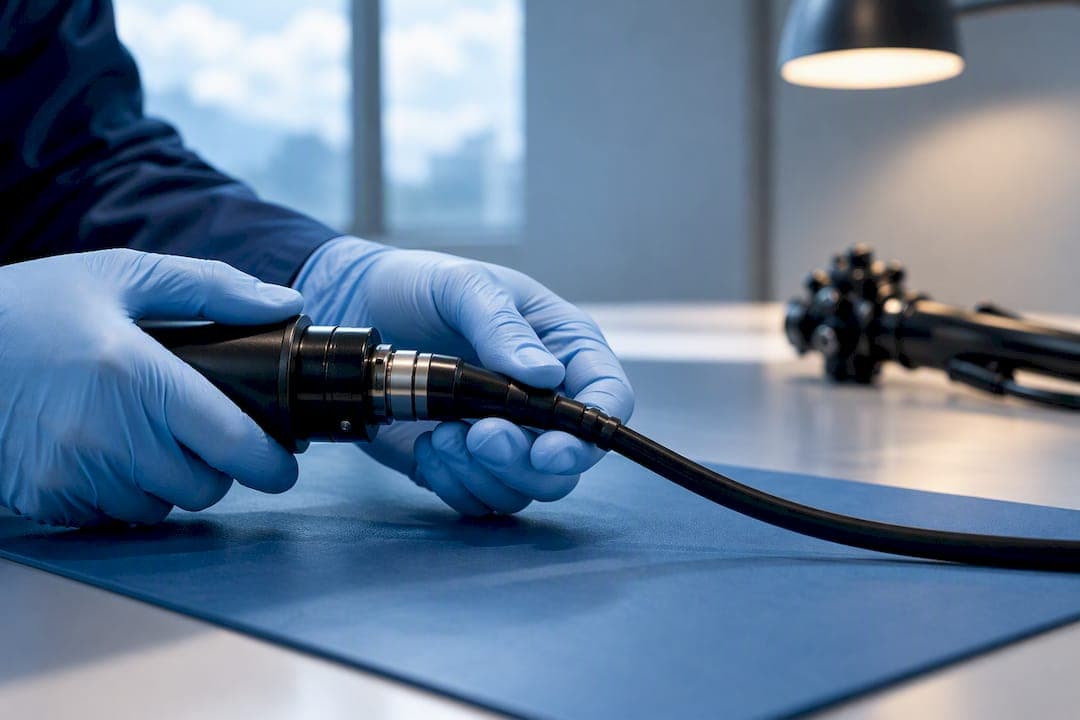
An endoscope camera head is the component that converts the optical image captured by an endoscope into a digital video signal for display and recording, and its function depends on the rest of the imaging chain around it. For professionals specifying equipment, the buying priority is simple: match sensor resolution and type to the coupler, confirm the coupler is compatible with your scope's mechanical interface, and verify the sterilization method matches your department's reprocessing workflow. Get those three right and everything else, from frame rate to housing durability, becomes a secondary comparison.
TL;DR:
- Compatibility between the camera head, scope, and coupler is crucial, with open standards like C-mount offering greater flexibility than proprietary interfaces.
- Sterilization methods like low-temperature plasma or ethylene oxide are necessary for many camera heads, as autoclaving is often not supported by modern models.
- Sensor resolution should match the application, with 1080p being sufficient for routine work and ultra-high-definition needed only for detailed surgical documentation.
- Properly matching optical zoom couplers preserves native resolution, while digital zoom reduces image quality and is less desirable.
- Serviceability, warranty terms, and availability of spare parts significantly influence the long-term value and performance reliability of the endoscope system.
Table of Contents
- Breaking down the imaging chain: sensor, coupler, housing, and cable
- Which specifications actually matter when comparing camera heads
- How to match couplers and interfaces without introducing image artifacts
- Sterilization methods and safe handling for reusable camera heads
- Matching a camera head to your use case and budget
- Where product and repair experience shapes these recommendations
- Balancing cost, compatibility, and future-proofing
- How 1800endoscope supports camera head selection and repair
- Sources
- FAQ
Breaking down the imaging chain: sensor, coupler, housing, and cable
A video endoscopy system only performs as well as its weakest link. The camera head sits in the middle of a chain that includes the endoscope itself, the coupler that connects the two, the camera control unit (CCU) that processes the signal, and the monitor that displays it. A high-resolution camera head paired with an aging fiberscope or a low-resolution monitor will never deliver the image quality its specifications suggest, since overall system performance depends on every link in that chain, not just the newest one.
The sensor is the camera head's core component. Most current medical and industrial units use CMOS sensors rather than CCD, largely because CMOS offers better power efficiency and faster readout, though CCD sensors still appear in some legacy and budget systems where low-light performance at a given price point matters more than speed. FDA device summaries for cleared camera heads confirm that modern systems typically use CMOS sensors with resolutions ranging from HD to ultra-high-definition, and resolution tier should be chosen based on the procedure, not simply the highest number available.
The coupler is the optical-mechanical bridge between the endoscope's eyepiece and the camera sensor. It physically projects the image from the scope onto the sensor surface, and its quality has as much bearing on final image sharpness as the sensor itself. Couplers come in two broad types: fixed couplers, built for a single scope and offering a stable, simple setup, and zoom couplers, which allow magnification adjustment and multi-scope compatibility at the cost of some added complexity. Most professional systems use a C-mount mechanical interface to attach the coupler to the camera head, though some manufacturers use proprietary mounts that limit third-party compatibility.
Housing and cable specifications round out the physical build:
- Sealed housings with IP-rated protection guard against fluid ingress during cleaning and clinical use.
- Control buttons on the camera head let operators trigger image capture or freeze-frame without reaching for the CCU.
- Cable type and connector design determine how the head interfaces with the CCU, and cable failure is one of the most frequent points of mechanical wear.
- Strain relief at the connector reduces the risk of intermittent signal loss from repeated flexing during procedures.
Which specifications actually matter when comparing camera heads
Not every spec sheet line deserves equal weight. Procurement teams evaluating multiple camera heads should focus on a short list of specifications that drive real-world image quality and operational reliability rather than marketing language.
Resolution is the most visible spec, but the right tier depends on the application. For many veterinary and industrial users, a midrange 1080p camera head paired with a high-sensitivity CMOS sensor and a zoom coupler offers the best balance of cost, durability, and image quality. Ultra-high-definition sensors earn their premium in surgical documentation or diagnostic work where fine tissue detail changes clinical decisions, but for routine inspection or field veterinary work, 1080p often meets the need without the added cost and file size of 4K recording.
Sensor size and signal-to-noise ratio matter more than raw pixel count in low-light procedures, since a larger sensor with better light-gathering capacity will outperform a smaller, higher-resolution sensor once illumination drops. Frame rate and latency affect how smoothly the operator can navigate in real time, which matters more in surgical or interventional settings than in static industrial inspection. Some clinical camera heads also support specialized imaging modes such as narrow-band imaging (NBI) or indocyanine green (ICG) fluorescence, which are worth evaluating only if your procedures actually use them.
When comparing sterilization compatibility, note that many camera heads are not autoclavable and require low-temperature methods instead. That single fact, confirmed in AAMI's guidance on device reprocessing, should be checked before any other spec on the list, because it determines whether the unit fits your existing reprocessing workflow at all.
- Connectivity options (wired CCU, SD card recording, wireless transmission) should match your existing recording and storage infrastructure.
- Serviceability and warranty terms determine total cost of ownership more than the sticker price alone.
- Expected useful life should factor into any price comparison between competing units.
How to match couplers and interfaces without introducing image artifacts
Compatibility mistakes are the most common source of disappointing image quality in an otherwise capable system. Optical zoom achieved through a properly matched coupler preserves native resolution, while digital zoom crops the sensor's active area and reduces effective resolution, so treat any camera head advertised primarily on digital zoom capability with some skepticism.
Vendor ecosystems add another layer of complexity. Some manufacturers design proprietary mechanical and optical interfaces that lock a camera head to that vendor's scopes and couplers, while others use open standards like C-mount that allow mixing components across brands. The coupler itself functions as the optical-mechanical interface that projects the endoscope image onto the sensor, and choosing the right one is a purchase decision in its own right, not an afterthought bolted onto the camera head order.
Before signing off on any new camera head, run this sequence:
- Select a fixed coupler for single-scope setups where simplicity and stability matter more than flexibility.
- Select a zoom coupler when the department runs multiple scope diameters or needs in-procedure magnification adjustment.
- Attach the candidate camera head and coupler to a representative scope and record a controlled target, such as a color chart and resolution chart, at the actual procedure working distance.
- Check the recording for edge-to-edge focus, color fidelity, and vignetting before completing purchase paperwork, since mismatched eyepieces and couplers are a common source of vignetting and chromatic aberration in field use.
- If the image shows a green cast, blur, or dark corners, check the coupler seating and scope-to-coupler alignment first before assuming the camera head itself is faulty.
Reading more on how small-diameter endoscopes interface with cameras helps clarify how scope diameter interacts with coupler choice in veterinary settings specifically.
Sterilization methods and safe handling for reusable camera heads
Reprocessing constraints should shape a purchase decision as much as any optical spec, because a camera head that cannot survive your facility's standard sterilization cycle creates ongoing risk and cost. Guidance from AAMI notes that modern camera heads may tolerate low-temperature plasma sterilization such as STERRAD or ethylene oxide gas, but many models are not autoclavable, and manufacturer labeling along with IEC and clinical guidance should be consulted for the exact method each specific model supports.

The IEC 60601 family of standards, along with related ISO references, governs electrical safety and performance expectations for medical electrical equipment including camera heads, and FDA device summaries for cleared units list these applicable standards alongside instructions to use the camera head only with its indicated CCU and endoscope.
Practical handling steps reduce both damage risk and infection risk:
- Pre-clean immediately after use to prevent organic material from drying onto the housing or connector.
- Leak-test before sterilization on any unit rated for immersion, since a compromised seal can allow fluid ingress during the sterilization cycle itself.
- Store in a padded, ventilated case rather than loose in a drawer, since connector and cable damage account for a large share of service calls.
- Escalate to biomedical engineering whenever a unit shows intermittent image dropout, unusual heat during use, or any sign of housing damage, rather than continuing to cycle it through sterilization.
Pro Tip: Keep a laminated card near the reprocessing station listing each camera head model's approved sterilization method, since mixing up STERRAD-only and EtO-only units is one of the most preventable causes of premature failure.
For a fuller walkthrough of reprocessing workflows specific to animal care settings, see this guide to sterilization in veterinary endoscopy.
Matching a camera head to your use case and budget
The right camera head depends heavily on what you are actually doing with it. Industrial pipe and airway inspection work prioritizes portability, direct SD-card recording, and durability over ultra-high resolution, since the goal is documentation of a defect, not diagnostic-grade tissue detail. Veterinary documentation work benefits from a balance of image quality and ease of use across a range of animal sizes and scope diameters. Surgical imaging demands the highest sensor sensitivity, lowest latency, and broadest CCU compatibility, since clinical decisions depend on real-time image fidelity.
Price is driven by a combination of factors rather than any single spec:
- Sensor quality and resolution tier account for much of the price spread between entry-level and premium camera heads.
- CCU platform compatibility can add cost if the camera head requires a specific proprietary processor.
- Sterilization rating often correlates with price, since housings engineered for STERRAD or EtO compatibility require more robust sealing.
- Service contract terms affect long-term cost more than many buyers initially budget for.
A practical procurement checklist before finalizing any order: confirm the mechanical and optical interface matches your existing scopes and CCU, request a test recording on your own equipment rather than relying on manufacturer samples, ask about spare parts availability, and clarify warranty and service turnaround times in writing. Camera heads typically last several years with proper care, with technological obsolescence and accidental damage as the primary replacement drivers rather than simple wear, so budgeting for at least one spare cable and one spare coupler at purchase time reduces downtime risk since cable failures are the most common service call across camera head fleets.
Readers evaluating a fully portable option for field inspection work can review this portable airway inspection endoscopy system as one example of a self-contained SD-card recording setup, and for guidance on getting the most out of recorded footage once a system is in place, see this overview of optimizing endoscope video recording.
Where product and repair experience shapes these recommendations
These recommendations reflect the practical reality of specifying and maintaining endoscopy equipment across veterinary and industrial settings. 1800endoscope's product catalog spans medical endoscopes and accessories, veterinary rigid and flexible scopes, biopsy forceps, and industrial borescopes and portable inspection videoscopes, alongside endoscope repair services that regularly surface the same failure points discussed above: cable wear, coupler mismatch, and sterilization method confusion.
A typical veterinary configuration pairs a midrange 1080p camera head with a zoom coupler to accommodate multiple scope diameters across small and large animal work. A typical industrial configuration favors a portable, SD-card recording videoscope where ruggedness and field usability outweigh resolution. Readers weighing data handling and storage policies alongside equipment specs may also find this policy guidance on security cameras and compliance useful when documenting imaging workflows in clinical settings.
Balancing cost, compatibility, and future-proofing
The temptation in procurement is to chase the highest resolution number on the spec sheet. The better long-term bet is sensor sensitivity and coupler compatibility, because those two factors determine whether a camera head still performs well once your scope fleet changes. Open interfaces like C-mount are worth the small compatibility trade-off over proprietary ecosystems unless a vendor's service and support genuinely justify the lock-in. Above all, buy into a parts and service plan, not just a camera head, since serviceability determines whether year five looks like year one.
— Endoscope
How 1800endoscope supports camera head selection and repair
Choosing between resolution tiers, coupler types, and sterilization ratings gets easier with a supplier who can verify compatibility before you commit to a purchase. 1800endoscope carries medical endoscopes and accessories alongside veterinary and industrial lines, and its repair service handles the cable and coupler failures that account for most downtime.
Relevant categories to browse based on your application:
- Medical camera heads and accessories for clinical documentation and diagnostic work.
- Rigid scopes, arthroscopes, and otoscopes for veterinary procedural work.
- Flexible biopsy forceps for tissue sampling alongside your imaging setup.
- Borescopes and portable pipe inspection videoscopes for industrial NDT applications.
Contact a supplier to request a test recording, confirm coupler and CCU compatibility with your existing fleet, or get a repair estimate before committing to a new purchase.
This article is general information, not a substitute for advice from a qualified doctor. Consult a qualified healthcare professional about your own circumstances before acting on anything here.
Sources
- FDA 510(k) | K222504 (KARL STORZ H1 camera head)
- Digital zoom vs optical zoom (white paper)
- Endoscopy camera coupler (Nareseal Atlas)
- Sterilization practices and device labeling guidance (AAMI/article)
FAQ
What is the difference between a borescope and an endoscope camera?
A borescope is generally built for industrial inspection of mechanical spaces like pipes or engines, prioritizing durability and portability over clinical-grade optics. A medical endoscope camera head is built to meet clinical imaging standards and regulatory requirements such as IEC 60601, with sterilization compatibility built into its housing design.
How much does an endoscopy camera cost?
Cost varies widely based on sensor resolution, coupler type, CCU compatibility, and sterilization rating, and no single published price applies across the category. Contact a supplier directly for a quote based on your specific application and required specifications.
What is the tool used in an endoscopy procedure called?
The imaging component is called an endoscope camera head, and it works alongside the endoscope, a camera control unit, and a monitor to form the complete imaging chain. Each piece depends on the others for overall image quality.
Is video endoscopy painful?
Discomfort during an endoscopic procedure depends on the specific procedure, sedation approach, and patient factors, and is a clinical question best directed to the treating provider rather than answered generically here. The camera head itself has no bearing on procedural comfort since it only handles image capture, not the physical scope insertion.