
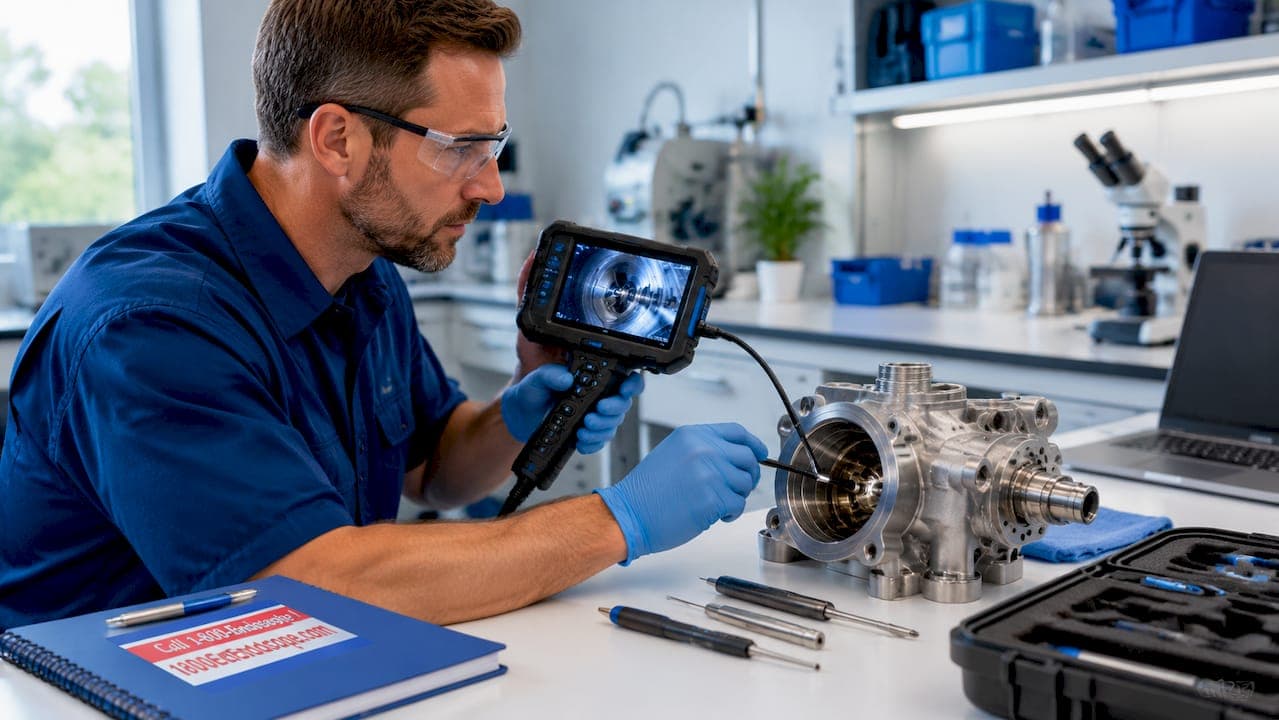
Borescope display screen types generally fall into three categories: built-in monitor screens, wired USB or PC-connected displays, and Wi-Fi wireless links to mobile devices. Each type creates a different workflow, and the wrong choice costs you setup time, image clarity, or reliability when it matters most. This guide breaks down all three display types alongside screen technologies like TFT LCD and IPS, so industrial technicians and veterinary professionals can match the right display to their actual inspection conditions.
1. borescope display screen types compared: the three core options
The three main borescope display screen types define how you receive and interact with the live image from the camera probe. Built-in monitor units carry their own screen on the handset. USB-connected models route the image to a phone or laptop via a wired cable. Wi-Fi models transmit wirelessly to a smartphone or tablet running a companion app.
Your choice between these types is primarily a workflow decision. Simpler screen-based units win on reliability because they have fewer dependencies that can fail. USB and Wi-Fi options trade that reliability for lighter weight and easier image sharing.

Understanding this split is the foundation of any smart purchasing decision. The sections below go deeper into each type, then cover screen technology and size so you have the full picture.
2. built-in monitor borescopes: advantages and limitations
Built-in monitor borescopes carry a dedicated screen directly on the device body. No phone, no app, no pairing required. You power on the unit and the live image appears immediately.
Key advantages of built-in monitor displays:
- No OS compatibility issues or app updates to manage
- Minimal latency between probe camera and displayed image
- Designed for rugged field and shop environments
- Single battery system powers both probe and screen
- Faster setup time in time-sensitive inspections
The ruggedness and reliability of built-in screens make them the preferred choice for professionals who inspect frequently. A veterinary technician scoping a horse airway in a barn or an NDT technician checking turbine blades on a flight line cannot afford a pairing failure or an app crash. Built-in screens eliminate those risks entirely.
The tradeoff is physical size and weight. A unit with a 5-inch TFT LCD capacitive touchscreen, like the Anyty 3R-PPMC-B, is bulkier than a bare probe with a USB cable. Battery management also becomes a single-point concern since the screen and probe share one power source.
Pro Tip: When inspecting in direct sunlight or bright shop lighting, prioritize built-in screens with brightness ratings above 400 nits. Dim screens in high-ambient-light environments cause missed defects, not just discomfort.
3. USB wired borescope displays: how they work and when to use them
USB-connected borescopes send the live camera feed to a phone or laptop via USB-C or USB OTG. The phone or laptop becomes the display. This approach produces a lighter, more portable inspection tool because the handset carries no screen of its own.
Key advantages of USB wired displays:
- Lighter and more compact than built-in screen units
- Leverage the processing power and screen quality of your existing phone or laptop
- Easier to record and transfer footage directly to a computer
- Generally more affordable at equivalent camera resolution
- Stable wired connection with no wireless interference risk
The limitation is compatibility. USB-connected models carry medium-to-high compatibility risk depending on the phone OS version, USB driver support, and the app required. An Android phone running a recent OS may work perfectly while an older device or an iPhone requires an adapter and a different app entirely.
Cable length also restricts movement. If you need to thread a probe 10 feet into a duct while watching the screen from a comfortable position, a short USB cable forces awkward posture. Extension cables help but add another potential failure point.
Pro Tip: Test your USB borescope with the exact phone model and OS version you plan to use in the field before the job. Do not assume compatibility based on the manufacturer's general "Android/iOS supported" claim.
4. wi-fi wireless borescope displays: pros, cons, and real-world risks
Wi-Fi borescopes broadcast the camera feed over a local wireless network to a smartphone or tablet. The phone connects to the borescope's own Wi-Fi hotspot, opens the companion app, and displays the live image. No cable runs between the probe handset and the screen.
Key advantages of Wi-Fi wireless displays:
- Complete cable-free operation between probe and viewing screen
- Multiple team members can view the same live feed simultaneously
- Easy to share images and video clips directly from the phone
- Tablet-sized screens available for larger viewing area without adding bulk to the probe unit
- Flexible positioning of the viewer relative to the probe operator
The risks are real and worth taking seriously. Wi-Fi borescopes are sensitive to app and pairing issues and latency problems. Radio frequency interference from industrial equipment, other Wi-Fi networks, or Bluetooth devices can degrade the signal and introduce lag. A half-second delay between probe movement and screen update is disorienting and slows inspection pace.
Battery drain accelerates when the probe is running its own Wi-Fi hotspot. Expect noticeably shorter run times compared to a built-in screen unit of equivalent camera quality. App installation and initial pairing also add setup time, which compounds if the app requires an update before it will connect.
Wi-Fi displays suit occasional inspections where mobility and image sharing matter more than speed and reliability. For daily high-volume industrial or veterinary work, the added complexity creates friction that built-in screens avoid entirely.
5. screen technology: TFT LCD vs IPS and why it matters
Screen technology determines what you actually see during a live inspection, not just how comfortable the viewing experience feels. The two dominant technologies in borescope displays are TFT LCD and IPS LCD.
TFT (thin-film transistor) LCD screens are common in budget and mid-range borescopes. They deliver adequate brightness and acceptable color in direct viewing angles. The problem appears when you tilt the screen or view it from the side. Cheaper TFT screens often appear flatter and less contrasty than saved images, which means the live view can mislead you about the severity of a defect. A hairline crack may look like a shadow on a TFT screen but show clearly in the recorded file.
IPS (in-plane switching) LCD screens offer wider viewing angles and more accurate color reproduction. A 7-inch IPS panel at 1280×720 or 1920×1200 resolution, like those found in Kentfaith industrial videoscopes, shows consistent color and contrast whether you view it straight-on or at a 45-degree angle. That consistency matters when you are crouching in an engine bay or leaning over a veterinary patient.
Pro Tip: Evaluate any borescope screen under the actual lighting conditions you work in before purchasing. A screen that looks sharp in a showroom or product photo may wash out completely under fluorescent shop lights or bright outdoor conditions.
Screen size and detection accuracy
Screen size directly affects detection speed and accuracy during live viewing, not just operator comfort. A 7-inch screen displays 3–4 times more viewable area than a typical 3.5-inch panel, which translates to catching subtle discoloration or micro-cracks that a smaller screen would render as indistinct blurs.
Larger screens also reduce the need to transfer files to a laptop for detailed review. When you can see a 1920×1200 image on a 7-inch IPS panel in the field, you make the call on-site and move on. That saves significant time across a full inspection day.
Advanced display features extend this advantage further. Touchscreen displays with side-by-side comparison of live versus saved images, as seen in units like the Extech FLIR videoscope with its 640×480 resolution touchscreen and IP67-rated probe, allow technicians to confirm a defect against a reference image without leaving the inspection area.
6. side-by-side comparison: borescope display types at a glance
The table below summarizes the practical tradeoffs across the three main display types and two primary screen technologies. Use it as a quick reference when narrowing your options.
| Display Type | Reliability | Portability | Setup Complexity | Best Use Case |
|---|---|---|---|---|
| Built-in monitor | High | Moderate | Low | Frequent, rugged, field inspections |
| USB wired | Moderate | High | Moderate | Budget-conscious, portable, occasional use |
| Wi-Fi wireless | Lower | Highest | High | Occasional inspections, multi-viewer sharing |
| TFT LCD screen | Moderate | N/A | N/A | Indoor, controlled lighting environments |
| IPS screen | High | N/A | N/A | Variable lighting, color-critical inspections |
Built-in monitor borescopes reduce dependency failures from OS updates, app issues, and wireless pairing problems. That single fact drives most experienced technicians toward built-in screens for any high-frequency inspection program.
Key takeaways
Built-in monitor borescopes deliver the highest reliability for industrial and veterinary inspections because they eliminate app, OS, and wireless dependencies entirely.
| Point | Details |
|---|---|
| Built-in screens win on reliability | No app or pairing required means fewer failure points during critical inspections. |
| USB displays suit portable, budget use | Wired connections are stable but require OS and app compatibility checks before field deployment. |
| Wi-Fi works best for sharing | Wireless displays add flexibility but introduce latency and battery drain risks in demanding environments. |
| IPS outperforms TFT for accuracy | IPS screens show consistent color and contrast at wider viewing angles, reducing missed defects. |
| Larger screens improve detection | A 7-inch panel displays 3–4 times more area than a 3.5-inch screen, catching subtle defects faster on-site. |
What i've learned after years of matching displays to inspection workflows
The most common mistake I see technicians make is choosing a borescope based on camera resolution while treating the display as an afterthought. The camera captures the data. The display is where you actually make the call. A 1080p camera feeding a washed-out TFT screen in a bright hangar is less useful than a 720p camera on a sharp 7-inch IPS panel.
My honest preference for industrial and veterinary work is the built-in monitor. I have watched Wi-Fi pairing failures kill inspection schedules and seen USB adapters fail mid-job. Flexible borescope diagnostics depend on the full system working together, and every added dependency is another thing that can go wrong at the worst moment.
That said, I recognize that USB-connected models make real sense for technicians who inspect infrequently and already carry a capable phone or laptop. The weight savings are genuine, and the cost difference can be significant. The key is testing the full setup before the job, not during it.
Screen size is the one area where I think most buyers underinvest. The jump from a 3.5-inch to a 7-inch IPS display is not a luxury upgrade. It is a detection accuracy upgrade. Screen size directly affects detection speed in ways that show up in your defect catch rate, not just your comfort level. If your inspection program involves any color-critical or micro-defect work, a larger IPS screen pays for itself quickly.
For veterinary and industrial videoscope applications, I also recommend prioritizing on-device documentation features. Freeze-frame, annotation, and side-by-side comparison reduce post-inspection documentation time. These workflow features matter as much as the display type itself once you are running a high-volume inspection program.
— Endoscope
Find the right borescope display at 1800endoscope
1800endoscope stocks a full range of borescopes across all three display types, from portable direct monitor systems with built-in screens and SD card recording to USB-connected field scopes designed for equine airway inspection. Whether you need a rugged built-in monitor for daily industrial NDT work or a lightweight wired scope for occasional veterinary diagnostics, the complete borescope catalog covers both markets with professional-grade options at competitive price points. The team at 1800endoscope can help you match display type, screen size, and probe diameter to your specific inspection workflow. Browse the catalog or reach out directly for expert guidance.
FAQ
What are the three main borescope display screen types?
The three main types are built-in monitor, USB wired connection to a phone or PC, and Wi-Fi wireless connection to a mobile device. Each type creates a different balance of reliability, portability, and setup complexity.
Which borescope display type is most reliable for field use?
Built-in monitor borescopes are the most reliable because they have no app, OS, or wireless pairing dependencies. Fewer dependencies mean fewer failure points during inspections in demanding environments.
Is IPS better than TFT LCD for borescope screens?
IPS screens offer wider viewing angles and more accurate color reproduction than TFT LCD panels. This makes IPS the better choice for color-critical inspections or any work done in variable lighting conditions.
How much does screen size affect inspection accuracy?
A 7-inch screen displays 3–4 times more viewable area than a 3.5-inch panel, which improves detection of subtle defects like micro-cracks and discoloration during live viewing. Larger screens also reduce the need to transfer files for offline review.
When does a wi-fi borescope display make sense?
Wi-Fi displays work best for occasional inspections where sharing the live feed with multiple viewers matters more than speed or reliability. They are not recommended for high-frequency industrial or veterinary inspection programs where latency and pairing failures create unacceptable workflow disruptions.